Showing posts with label Blender. Show all posts

Sunday, 5 August 2012

Learning Blender, getting on Polycount, and my game art portfolio.

I've registered with Polycount and will be posting things on my own Sketchbook thread there: 
http://www.polycount.com/forum/showthread.php?t=103296

I've also created a visible portfolio site on tumblr for Environment Art for games I create:

Here's the first image I've posted up on both of the above:


It's certainly not finished, but it will do for a placeholder for the finished version. Constructive critiques are very welcome, just post your suggestions in the comment box below.

Saturday, 28 July 2012

Learning Blender (Day 7) - Adding details and creating the other side of the street.

Here's how the place was looking at the end of Day 7:


I've added blocks to the front walls, arches to the front doors, windowsill ledges and gave the chimneys a little more character by adding those round things you find on the top... I've also added another  mirror modifier as you can see, to duplicate the other side of the street.

That was only really to see what it looks like with two sides of a street done. In reality, the other side of the street is slightly different to my side of the street. As practice for speeding up my modelling, I've tried modelling the opposite side of the street completely from scratch to see how far I could get in forty minutes. It wasn't quite far enough for my satisfaction, so I kept going. Here's how it looked after about two hours, with occasional distractions.

As you can see, the main difference is in the layout of the front window on the bottom floor.

I managed to make the basic shape, added the windows and door shapes, added the arches above the applicable window and door (according to a look out my window, the top windows in the houses opposite don't actually have arches. I'm not sure why...), added the windowsills, gave the chimney some character, added drainpipes and guttering, and added the front walls with some character and a plane for the dividing fence between the properties. I think this would probably be enough for a low poly game, at least for buildings that players never go into or see behind.

For more realism I suppose I would add the round things on the tops of the chimneys, and the TV aerials, but perhaps those are best done separately later anyway as they aren't all the same with some having extras and others missing some. The arches also have keystones that stick out slightly, which you don't find on the buildings on my side of the street.

Other than that I think the only thing I would do is tidy up some of the vertices to give it fewer polygons, for example, that line going straight down the side of the house would be removed, as would the faces for the houses not on the ends of the row and the floor faces I used as guidelines underneath it.

I'm thinking that today (Day 8) I'll read through Chapters 9 (Materials and Textures in Blender) and 10 (UV Unwrapping and Painting), have a bit of a play as I do, and then later tonight try another forty minute modelling-from-scratch challenge and see how it goes.

Thursday, 26 July 2012

Learning Blender (Day 6) - Modelling a Cardiff street.

Beginning yesterday evening, through to this afternoon, I've been working on a low-poly street; this time in Cardiff. Here's how it's looking today:

This is actually the street I live on...

So far I have done the basics of the fronts of the houses and the base, given the windows their characteristic arches on the upper edge and some windowframes, and added simple drainpipes and chimneys. I'm using Google maps for reference and utilising the Modifiers so that I only have to work on one house, and it updates the rest of the houses in the street.

From what I learned of the tutorial from my previous post, it should not be taking me a day to do one house, but something more like 40 minutes. I think I'm taking my time for a couple of reasons, one being because it is my own street. The other reason is I'm being distracted by the game of Assassins Creed my housemate is playing. Hopefully with experience I will be able to knock out the basic form for a whole street a lot faster.

However, the plus side of choosing these streets in Cardiff to model is that they all look quite similar in this area (a couple of times last year I had absent mindedly turned right too soon when walking back to my own house, only noticing my error halfway down the road), so it will be quite easy to make up a number of streets from this first house quickly, making only minor adjustments to define each street.

Monday, 23 July 2012

Learning Blender (Day 4) - Modelling a Low Poly Building for Games

www.pxleyes.com/video-tutorial/maya/15684/How-to-Model-a-Low-Poly-Building-for-Games.html

I found the video tutorial above that showed me someone creating a New York style building asset in about 40mins using Maya. Be warned; I had to turn the volume up on my laptop to hear it, and then he spent a lot of time talking quietly to himself - although that was mostly him thinking aloud about what shapes to make things and stuff like that... But other than that, it was worth watching to me.

I tried following along in Blender, and succeeded! Here's a screenshot of the wireframe and a render I lit with some coloured lighting. 

Definitely need to figure out how renders work...

The lighting was partly for fun... I'm likely to spend some time at some point learning how to light things properly and better, but I thought this would do for now since I'm focusing on learning the modelling tools first.

Sunday, 22 July 2012

Learning Blender - with Essential Blender (Day 3)

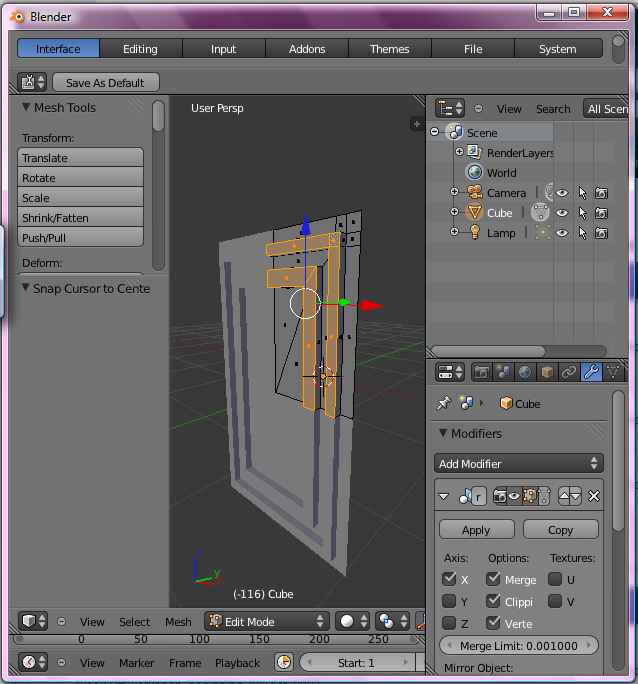
Here's what I've been working on today, for the model of my bedroom I'm going to make for practice and portfolio.

Tah dah!

I've modelled one of the doors in my bedroom. Still needs its handle though, and a hook, but I may do those separately since there are a few hooks in my bedroom.

I'm also hoping I get faster - this simple door took me almost all day.

Saturday, 21 July 2012

Learning Blender - with Essential Blender (Day 2)

Here is where I've reached this afternoon:


Unfortunately, I seem to have forgotten many of the keyboard shortcuts I've learned, so I will have to make this pillar all over again to try to program those shortcuts into my brain and body!

21st July 2012, 8.45pm -
There we go! Finished that section of the chapter. Here is the bridge it told me to make, with the render flowing into the wire-frame image.


Friday, 20 July 2012

Learning Blender - with Essential Blender

I'm finally getting around to going through the Essential Blender pdf book that I bought. Today, I have manipulated vertices, edges and faces, moving them around and extruding them in Blender for the first time.

I'm so happy. I'm so excited.

I'm so close to getting back to the level of knowledge I had in a 3D modelling program, one that I had access to until I graduated last year, when suddenly I lost access to that legit student version of Maya I have installed on my laptop.

Not content with the idea of pirating a copy just to make masterpieces of 3D game art for a portfolio or for my own devilish purposes, I backed away from 3D art completely until coming across the Autodesk 123D beta a few months ago. When I found out how to put a shiny texture onto on object imported into Blender, I saw the joy again.


That's the romanticised version. In truth, I wanted to try starting up a business selling something artistic I had created - but I suck at business. It's all very well knowing it by a book but, with entrepreneurship, you've got to be good at doing it.

So, it is time to get a job, preferably in the game biz making 3D objects for a game that I can later hear other people talking about playing, or maybe even with a company that needs renders of buildings that aren't built yet. But before I get a job, I need to give them something to show them that I can model, unwrap UVs, texture realistically and fantastically, and maybe a spot of rigging and animating.

Follow this blog to check my progress! :)